Current video size
Decoded width and height show what Chrome is currently playing, such as 1280 × 720 or 1920 × 1080. This is more precise than a badge printed by the page.
FREE CHROME EXTENSION
Use the PixelatedFix video quality checker extension to check video resolution in Chrome, compare decoded size with display size, and review dropped frames. Whether Chrome shows 1080p, 2K, or 4K, the check stays on the current tab.
The video quality checker extension explains whether a visible player is enlarging a smaller decoded video, distorting its shape, or reporting dropped frames. It checks the current playback rather than guessing from a thumbnail or page label.
Add to Chrome — freeFree diagnostic · No account · Checked locally on this tab. Nothing is uploaded.
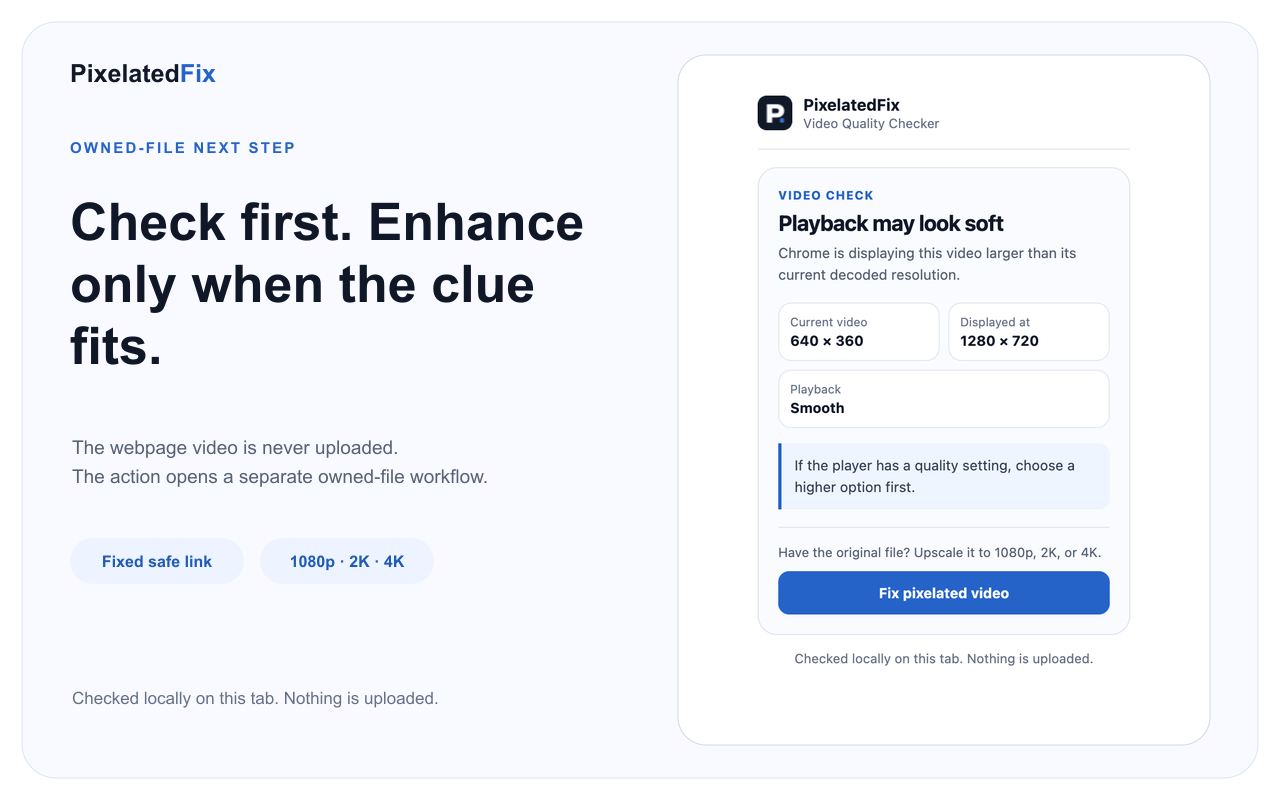
The extension selects the largest visible HTML5 video, preferring one that is actively playing. It reads only the facts needed for a useful answer, then turns them into plain-language guidance. The same video quality checker extension can work on many ordinary video pages without asking for access to every website.
Decoded width and height show what Chrome is currently playing, such as 1280 × 720 or 1920 × 1080. This is more precise than a badge printed by the page.
The Chrome video resolution checker compares the decoded dimensions with the visible player and checks whether object-fit preserves the aspect ratio.
When Chrome provides enough frame information, the dropped frame checker reports smooth, some dropped frames, or frequent dropped frames without inventing an FPS number.
If you ask “why does a video look blurry in Chrome,” start by separating playback from the file itself. A page may stretch 640 × 360 playback across a large player. Adaptive streaming may temporarily select a lower rendition. Browser zoom, fullscreen viewing, weak bandwidth, or a busy device can also change what you see.
A pixelated video checker cannot recover hidden information from a third-party stream, but it can show whether the current decoded size is smaller than the area displaying it. That distinction prevents you from treating a temporary playback setting as permanent damage to an original video.
To check YouTube video quality, start the video, open the extension, and compare Current video with Displayed at. If the video is being enlarged, open YouTube Settings → Quality and choose a higher available option. Wait for HD processing on a recent upload and compare again at the same player size.
The extension is not affiliated with or endorsed by YouTube. It does not download, import, or modify the webpage video, bypass controls, block ads, or reveal unavailable renditions. For deeper publishing help, use the guide to improve YouTube video quality or diagnose why a YouTube video is blurry.
The current video is being displayed more than 15% larger than its decoded size. Try a higher player quality before considering changes to an owned file.
The player shape differs from the video shape and the page may not be preserving the aspect ratio. Check player or export dimensions.
After enough frames, frequent or moderate frame loss is shown separately. Try a lower quality, close heavy tabs, or check hardware acceleration.
The decoded video covers the displayed player without obvious stretching. This describes the current playback, not the original upload's maximum quality.
If Chrome has not exposed decoded dimensions yet, play the video and check again. The result will not pretend an unready player has been measured.
Chrome settings, the Web Store, protected pages, and some cross-origin iframe players cannot be inspected. The extension does not request broader access.
The video quality checker extension runs only after you click it. It has no host permissions, background worker, remote code, analytics, video upload, or browsing-history collection. Playback dimensions and frame counts remain in the popup and are not sent to PixelatedFix.
Its two permissions are narrow: activeTab provides temporary access to the selected tab after your click, and scripting runs the packaged local check once. Read the full Chrome extension privacy policy for exact data and local preference details.
If a higher player setting solves the problem, keep the file unchanged. If your own original is genuinely low resolution, blocky, or soft, use the extension result as a clue—not a promise—and inspect the source file directly. You can then learn how to fix pixelated video or try the AI video upscaler for an owned file.
PixelatedFix can create 1080p, 2K, or 4K output, but enlargement cannot guarantee missing focus or detail will return. Compare real results, choose the smallest useful output, and keep the original. The extension never sends a webpage video into that process.
No. It reads a small set of playback facts that Chrome already exposes for the visible video. It does not download, import, or modify the webpage video.
It can report the current decoded size, displayed size, and available dropped-frame facts for a visible YouTube player. It cannot reveal a hidden master file or bypass the player. When playback looks enlarged, it suggests checking Settings → Quality first.
No. A clear result means the current decoded video covers the player at its present size. It does not prove the maximum available rendition or the quality of an original file.
Not when dropped frames come from browser performance, network conditions, or a busy device. The result recommends playback and device checks instead of selling enhancement for the wrong problem.
Need help with installation or a playback result? Email support@pixelatedfix.com.
PixelatedFix Video Quality Checker is now available in the Chrome Web Store. Install the free Chrome video quality checker to check video resolution, display scaling, and dropped frames on the current tab.